
What
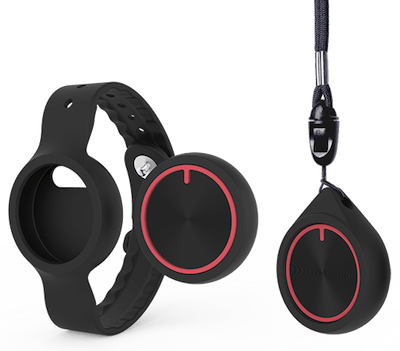
The Wearable Call Button (Gen 1) allows residents to call for help via a bluetooth button. This button can be worn around the neck as a pendent, or in a wristband. When pressed, the button starts a resident call through the Nobi system.
This version is paired to a housing unit, not to an individual resident. The housing unit may contain one or multiple Nobi lights, but the resident call will always be linked to that specific housing unit.
This means:
- The alert will show as coming from that housing unit.
- The button works within range of the Nobi light(s) installed in that housing unit.
- If the resident moves outside that housing unit, the button will not function.
The Wearable Call Button (Gen 1) uses a rechargeable battery that must be charged regularly. If the battery is empty, the button will not start a resident call.
The button can be worn as a bracelet or necklace and is fully waterproof, making it safe for use in the bath or shower. It is lightweight and designed for daily use.
Important limitations of Gen 1:
- The button is linked to a housing unit, not to a resident.
- The alert location is always the paired housing unit.
- It only works within that housing unit.
- It requires regular charging.
- It does not function independently outside the configured housing unit.
This version is no longer being distributed and will be replaced by the newer Wearable Call Button, which is connected to a resident as opposed to a housing unit. This means wearable calls can be made from anywhere in the community.
To learn more about the Wearable Call Button, visit our discover page here.
Why
Not every moment of need is a fall. With the Wearable Call Button (Gen 1), residents can ask for help at any moment—discreetly and directly.
However, because this version is tied to a specific housing unit and depends on battery charge, its use is limited to that environment and those conditions.
When pressed within the configured housing unit and with enough battery, the resident call follows the same escalation procedure as a fall and notifies care staff accordingly.
For information on how to maintain the Wearable Call Button (Gen 1), including changing the batteries, visit our guide here: How to maintain the Wearable Call Button (Gen 1)
For information on how to pair the Wearable Call Button (Gen 1) with Nobi, visit our guide here: How to pair the Wearable Call Button (Gen 1)