What
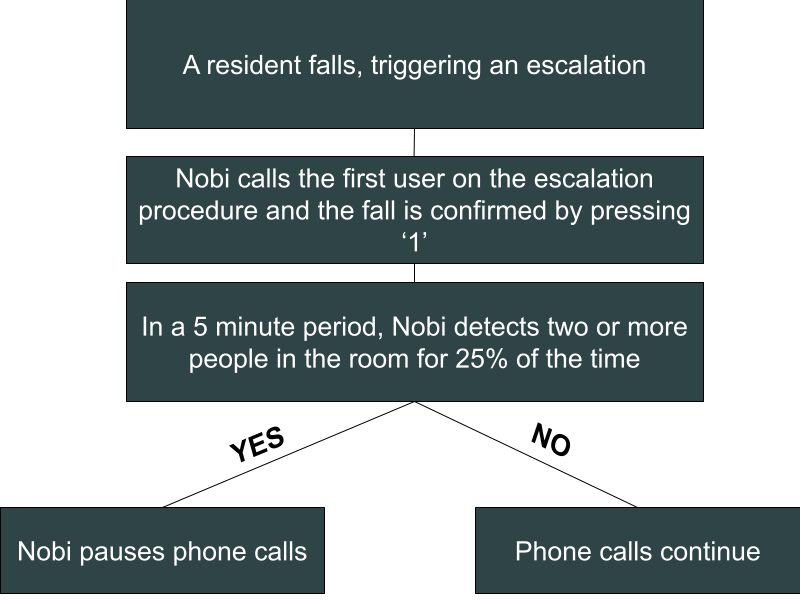
Automatic call pausing: after someone confirms an escalation by pressing “1” during the phone call from Nobi, Nobi pauses further phone calls if it detects two or more people in the room where the escalation happened. This avoids disturbing care staff who are already there and helping.
Why
This feature gives care staff more time to focus on helping residents instead of answering repeated phone calls from Nobi.
Automatically Pause Phone Calls During an Active Escalation
With this feature, Nobi checks the room where the escalation happened. It only checks that room, not the other rooms in the housing unit.
The check starts after someone confirms the escalation by pressing “1” during the phone call from Nobi. Claiming the escalation with On my way in the Nobi Mobile App does not start this check.
Nobi then looks at the last five minutes. If it detects two or more people in the room for more than 25% of that time, Nobi pauses further phone calls to care staff. Care staff who are already helping the resident are not interrupted by more phone calls from Nobi.
The pause only lasts while Nobi still detects two or more people in the room. If the escalation is still open and the second person has left, Nobi begins phone calling again 10 minutes after the last phone call.
Please note that this feature is not active in multi-person housing units, the shared zone of a Jack & Jill housing unit, or common areas.