
What
A housing unit is a resident’s living space in Nobi. It can hold several rooms, one for each device (Nobi light or Gateway) such as a bedroom, living room and bathroom.
In Nobi, there are four different types of housing units:
- Single person
- Multi-person unit
- Jack & Jill unit
- Common area.
For multi-person and Jack & Jill units, we prioritize privacy by applying the most restrictive user privacy, and housing unit settings. Smart monitoring has to be enabled for a resident before any smart feature works, fall detection and monitoring events included.
Two of the housing unit types have two set-ups:
- A multi-person unit is configured by bed type: one double bed, or two single beds.
- A common area is configured by device type: Nobi lights, or Nobi Gateways.
Why
It is important to know which type of housing unit to configure based on your resident living situation. What Nobi can do differs per type, and so does the way you configure it.
Choosing the type that matches the room means Nobi works the way your care team expects it to: each resident’s data is attributed to them, escalations reach the team with the right information, and privacy is respected in shared spaces.
Differences in Types of Housing Units
The illustrations below can help you figure out which type of housing unit you have to configure. Then, read more about each housing unit type below.
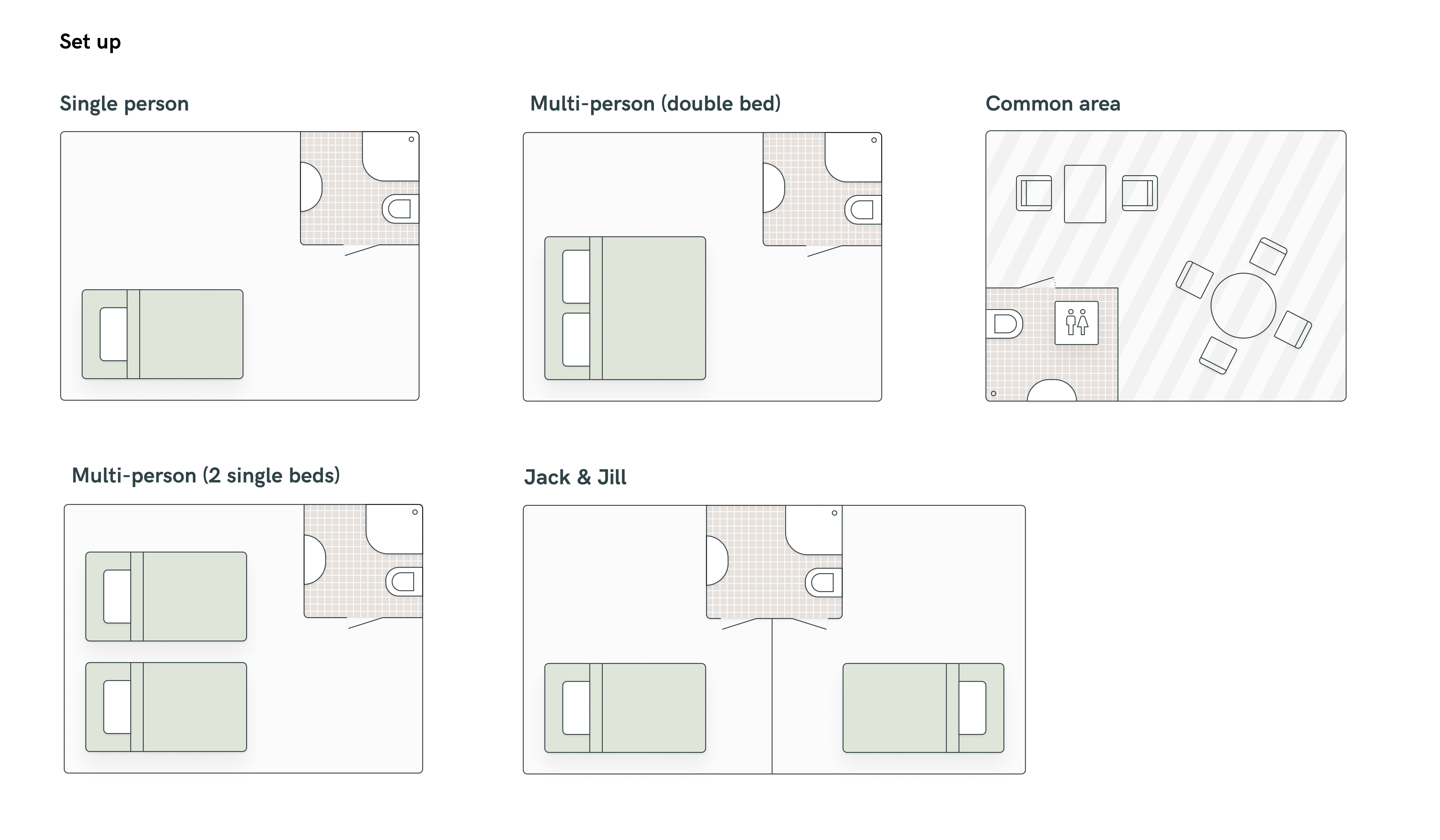
Single person
One resident in their own space. Everything Nobi can do is available here, and the resident’s own privacy settings apply.
| Resident occupancy | One |
|---|---|
| Fall detection | Yes |
| Resident named in the escalation | Yes |
| Monitoring events | All five: in bed, out of bed, sitting on the edge of the bed, out of room, in bathroom |
| Night reports | Yes |
| Two-way audio | Yes |
| Sound Cocoon | Yes |
| Live view and escalation images | Follows the resident’s privacy settings |
| Compatible Nobi Lights | All Nobi lights |
| Peripherals | Yes |
Good to know
- In bathroom needs a Nobita in the bathroom, and out of room needs the whole unit covered by Nobi lights.
Multi-person
Multi-person housing units are for two residents sharing one room. Both residents keep their own privacy settings, but the most restrictive of the two is what Nobi applies to the whole housing unit. So if one resident does not want images shared, that applies to the housing unit, and to the other resident with it.
The housing unit can be configured by the bed setup, either both residents in one double bed or each in a single bed. The bed set-up then decides how much Nobi can tell them apart: with two single beds it knows which bed belongs to whom, with one double bed it does not.
| One double bed | Two single beds | |
|---|---|---|
| Resident occupancy | Two | Two, one per bed |
| Fall detection | Yes | Yes |
| Resident named in the escalation | No | No |
| Monitoring events | In bathroom only | In bathroom, plus in bed, out of bed and sitting on the edge of the bed per resident |
| Night reports | No | Yes, per resident |
| Two-way audio | Yes | Yes |
| Sound Cocoon | No | No |
| Night light and morning greeting | No | No |
| Live view and escalation images | Follows the most restrictive of the two | Follows the most restrictive of the two |
| Compatible Nobi Lights | Gen 2 or 2.1 only | Gen 2 or 2.1 only |
| Peripherals | Yes | Yes |
Good to know
- A multi-person unit is not possible with a Gen 1 light. When a Gen 1 light is in the housing unit, the housing unit type is locked and cannot be changed to multi-person.
- Housing unit settings apply to both residents and cannot be set per resident.
- Out of room monitoring event is not available.
- With two single beds, the beds must be identified after the light is added. If a bed or the light moves, Nobi raises the technical issue Bed is no longer properly detected. Identify the beds again to fix this.
- The unit cannot be changed back to a single person unit while two residents are linked to it.
Jack & Jill
Jack and Jill housing units are best for two residents who each have a private room and share one or more rooms, usually a bathroom. The unit is split into zones: one private zone per resident, and a shared zone for the rooms they use together.
| Resident occupancy | Two, one per private room |
|---|---|
| Fall detection | Yes, everywhere in the unit |
| Resident named in the escalation | Yes in a private zone, no in the shared zone |
| Monitoring events | In bathroom only |
| Night reports | Yes |
| Two-way audio | Yes |
| Sound Cocoon | Yes in a private zone, no in the shared zone |
| Live view and escalation images | Follows each resident’s privacy settings, except in the shared zone. In shared zones, the most restrictive privacy settings apply. |
| Compatible Nobi Lights | All Nobi lights |
| Peripherals | Yes, paired per zone |
Good to know
- A presence button in a private zone pauses that zone and the shared zone. One in the shared zone pauses the whole unit. Either one closes an open escalation.
- A peripheral paired to the wrong zone reports against the wrong resident.
- Two single person housing units can be transformed into a Jack and Jill via Nobi Support.
Common area
Common areas are shared spaces that belong to everyone rather than to one resident, such as a lounge, dining room or hallway. They can be covered by Nobi Lights, or by Nobi Gateways where only wearable calls and Badge-triggered assistance calls can be detected.
| Nobi lights | Nobi Gateways | |
|---|---|---|
| Resident occupancy | None | None |
| Fall detection | Yes | No, wearable calls and Badge-triggered assistance calls only |
| Resident named in the escalation | Location announced, not resident | Location announced, not resident |
| Monitoring events | None | None |
| Night reports | No | No |
| Two-way audio | Yes | No |
| Sound Cocoon | No | No |
| Live view and escalation images | Off by default, a community can allow footage in common areas | No |
| Compatible Nobi Lights | Any Nobi light | Nobi Gateway, several for a large space or a long corridor |
| Peripherals | Yes | No |
Good to know
- A resident cannot be assigned to a common area, so there are no resident insights for it.
- A private housing unit cannot be converted into a common area.
- Gateways can be powered separately from the lights, so calls still get through during a short power outage.
- Caregivers can also request assistance in the Nobi Mobile App for a common area, whether it is covered by Nobi lights or Gateways. They choose the location themselves, so no Badge needs to be picked up.
To learn more about how to configure housing units, read our guides: